
API 脚本 - add.js
add.js 脚本用于创建新的 Vue 模块,自动生成包含搜索、表格、增删改查等功能的完整页面模板。
功能特性
- 快速创建:一键生成完整的 Vue 页面模块
- 模板化:基于预定义模板生成标准化代码
- 自动配置:根据参数自动配置 API 接口和功能
- 完整功能:包含搜索、表格、分页、新增、编辑、详情、导出等功能
基础用法
1. 基本命令
使用格式:
bash
npx init <moduleName> [options]选项参数:
bash
npx init <moduleName> [-p <customPath>]]案例:
bash
# 基本用法
npx add test

# 指定路径
npx add test -p src/views/JSCJadmin
交互式命令行
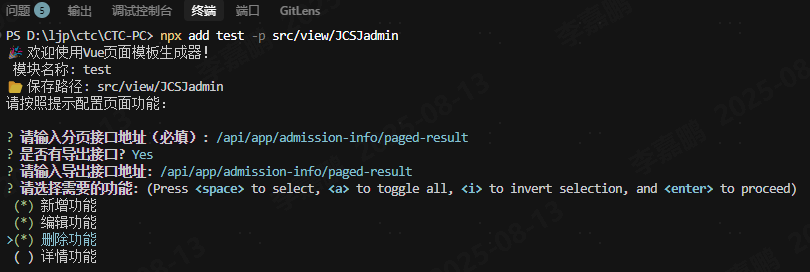
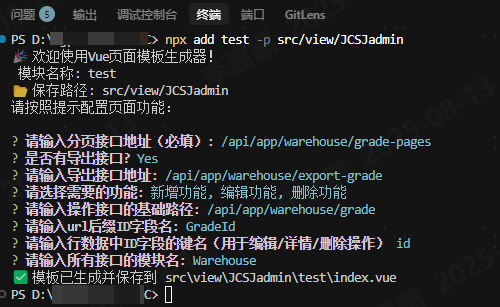
生成的文件结构
执行脚本后,会在指定路径下生成以下文件:
bash
src/views/JSCJadmin/test
└── index.vue # Vue 页面组件文件
示例生成的文件内容
vue
<!--
  Filename: test.vue
  name: test
  Created Date: 2025/7/13 11:28:08
  Author:
-->
<template>
  <div>
    <ol-search
      :url="swaggerUrl.getWarehouseGradepages"
      :form-search-data="formSearchData"
      @handleSearch="handleSearch"
      @handleReset="handleReset"
    />
    <ol-table
      :url="swaggerUrl.getWarehouseGradepages"
      :paginations="paginations"
      :btnlist="this.hasBtn(this)"
      :empty-img="tableData.emptyImg"
      :table-data="tableData"
      :multiple-selection="multipleSelection"
      @SelectionChange="SelectionChange"
      @handleSizeChange="handleSizeChange"
      @handleindexChange="handleindexChange"
    />
    <el-dialog :title="this.form.title" :visible.sync="dialogVisible" width="80%">
      <ol-form
        v-if="dialogVisible"
        :url="swaggerUrl.postWarehouseGrade"
        :form="form"
        @onCancel="onCancel"
        @onSubmit="onSubmit"
      />
    </el-dialog>
  </div>
</template>
<script>
import {
  getWarehouseGradepages,
  postWarehouseGrade,
  putWarehouseGradeByGradeId,
  deleteWarehouseGradeByGradeId
} from "@/api/modules";
import { Warehouse } from "@/api/swagger";
export default {
  name: "Test",
  data() {
    return {
      swaggerUrl: Warehouse,
      multipleSelection: [],
      // 查询表单
      formSearchData: {
        reset: true, // 重置
        expendShow: true, // 展开
        value: {},
        tableSearch: []
      },
      // 表格数据
      tableData: {
        loading: false,
        emptyImg: true,
        options: {
          selection: true, // 多选框
          index: null, // 序号
          headTool: true, // 开启头部工具栏
          refreshBtn: true, // 开启表格头部刷新按钮
          downloadBtn: true // 开启表格头部下载按钮
        }, // 序号和复选框
        rows: [], // 表数据
        columns: [],
        operatesAttrs: {},
        operates: [], // 表格里面的操作按钮
        tableHeightDiff: 330
      },
      paginations: {
        page: 1, // 当前位于那页面
        total: 10, // 总数
        limit: 30, // 一页显示多少条
        pagetionShow: true
      },
      form: {
        type: 0, // 0详情,1新增, 2编辑
        title: "",
        // 默认值
        defaultValue: {},
        value: {},
        model: [],
        rules: {},
        attrs: {}
      },
      dialogVisible: false
    };
  },
  created() {
    this.init();
  },
  methods: {
    async init() {
      const params = {
        ...this.formSearchData.value,
        Page: this.paginations.page,
        MaxResultCount: this.paginations.limit
      };
      const { result: { items = [], totalCount = 0 } = {} } = await getWarehouseGradepages(params, {
        isLoading: true
      });
      this.tableData.rows = items;
      this.paginations.total = totalCount;
      this.tableData.emptyImg = true;
    },
    handleSearch(from) {
      this.formSearchData.value = { ...from };
      this.paginations.page = 1;
      this.init();
    },
    handleReset() {
      for (let key in this.formSearchData.value) {
        this.formSearchData.value[key] = null;
      }
      this.paginations.page = 1;
    },
    SelectionChange(row) {
      this.multipleSelection = row;
    },
    handleSizeChange(val) {
      this.paginations.page = 1;
      this.paginations.limit = val;
      this.init();
    },
    handleindexChange(val) {
      this.paginations.page = val;
      this.init();
    },
    export() {
      const timer = this.formSearchData.value.createdTime;
      this.formSearchData.value.BeginTime = timer ? timer[0] : "";
      this.formSearchData.value.EndTime = timer ? timer[1] : "";
      this.post({
        url: Warehouse.postWarehouseExportgrade,
        isLoading: true,
        responseType: "blob",
        data: Object.assign(this.formSearchData.value, {
          Page: this.paginations.page,
          MaxResultCount: this.paginations.limit
        })
      }).then(res => {
        this.fnexsl(res);
      });
    },
    addBtnHandler() {
      this.form.type = 1;
      this.dialogVisible = true;
    },
    editBtnHandler() {
      const data = this.multipleSelection;
      if (data.length !== 1) return this.$message.info("请选择一条数据");
      const row = data[0];
      this.form.type = 2;
      this.form.value = { ...row };
      this.dialogVisible = true;
    },
    onCancel() {
      this.dialogVisible = false;
    },
    async onSubmit({ form, data }) {
      if (form.type === 1) {
        // 新建
        const res = await postWarehouseGrade(data);
        if (res.code !== 200) return;
        this.$message("新建成功");
      } else if (form.type === 2) {
        // 编辑
        const res = await putWarehouseGradeByGradeId(data["id"], data);
        if (res.code !== 200) return;
        this.$message("编辑成功");
        this.init();
      }
      this.init();
      this.onCancel();
    },
    deleteBtnHandler() {
      const data = this.multipleSelection;
      if (data.length !== 1) return this.$message.info("请选择一条数据");
      const row = data[0];
      this.$confirm("确认删除当前数据吗?", "提示", {
        confirmButtonText: "确定",
        cancelButtonText: "取消",
        type: "warning"
      })
        .then(() => {
          deleteWarehouseGradeByGradeId(row.id)
            .then(() => {
              this.$message.success("删除成功");
              this.init();
            })
            .catch(() => {
              this.$message.error("删除失败");
            });
        })
        .catch(() => {});
    }
  }
};
</script>
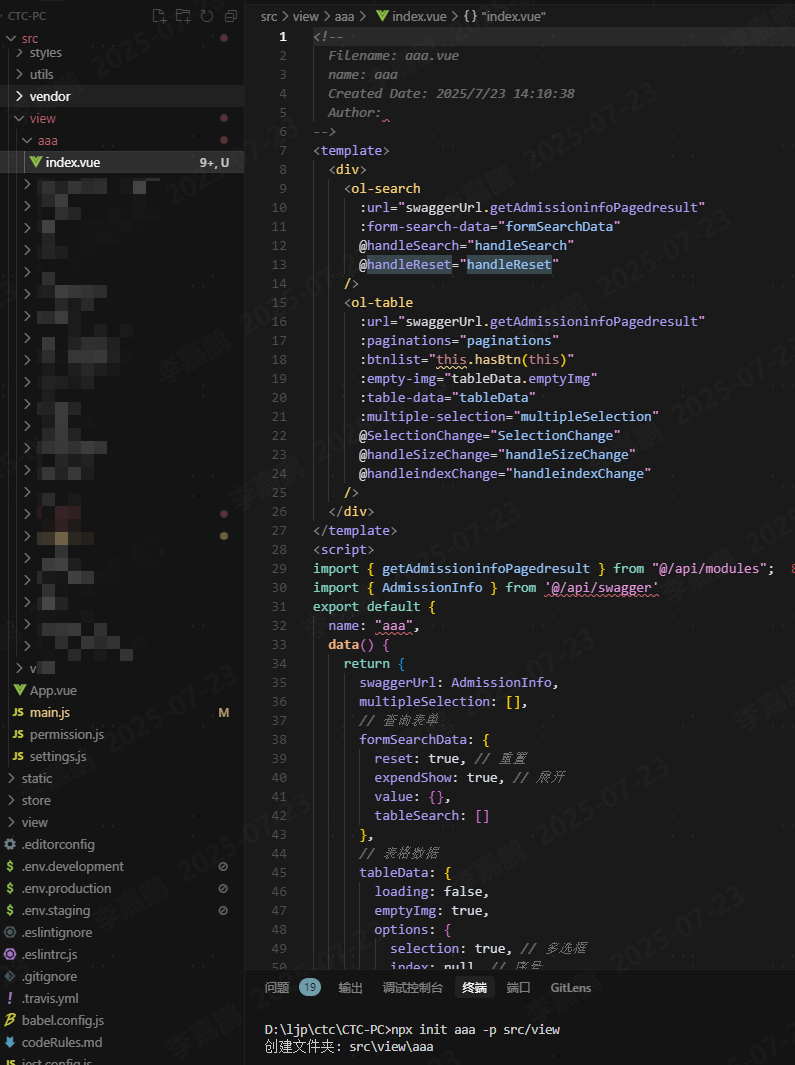
效果图
URL 转换规则
脚本会自动处理 URL 路径,生成合适的函数名:
| 原始 URL | 生成的函数名 | 说明 |
|---|---|---|
/api/app/user/list | getUserList | 获取用户列表 |
/api/app/user/export | exportUserList | 导出用户列表 |
/api/app/order/create | postOrderCreate | 创建订单 |
/api/app/product/{id}/update | putProductByIdUpdate | 更新产品 |
转换规则说明
- 移除前缀:自动移除
/api/app前缀 - 处理路径参数:
{id}转换为ById - 驼峰命名:使用驼峰命名法生成函数名
- HTTP 方法前缀:添加
get、post、put、delete前缀
常见问题
Q: API 接口不存在怎么办?
- 确保 Swagger URL 正确
- 检查 API 路径是否正确
- 确保已运行
npx init生成 API 文件 - 检查 Swagger 文档中的接口定义
相关链接
通过 add.js 脚本,你可以快速创建功能完整的 Vue 页面模块,提升开发效率! 🚀